

📌 TL;DR
AI business process automation adds AI to workflow automation for the steps rules can't handle: reading documents, classifying requests, extracting data, and suggesting decisions.
The reliable pattern is AI inside a governed workflow: deterministic steps for system updates, AI for judgment, and a person for low-confidence or high-risk cases.
Start with one high-volume process, measure accuracy and cycle time, and put controls on what AI is allowed to change.
AI business process automation uses artificial intelligence to automate the parts of a business process that rule-based automation can't: understanding an invoice that arrives as a PDF, routing an email to the right team, extracting fields from a contract, or recommending whether to approve an exception. It builds on workflow automation and integration rather than replacing them. The workflow still moves data between systems; AI handles the steps that need interpretation.
This guide explains where AI adds value in business processes, how a well-designed AI workflow is put together, and how to keep it accurate and governed. For the foundation, see business process automation.
What AI adds to process automation
Traditional automation follows explicit rules: if the order total is over a limit, route it for approval. It's fast and predictable, but it breaks on anything unstructured or ambiguous. AI fills those gaps:
| Task | Rule-based automation | With AI |
|---|---|---|
| Reading documents | Needs fixed templates | Extracts fields from varied invoices, contracts, and forms |
| Routing requests | Keyword rules that miss context | Classifies intent and urgency from free text |
| Data quality | Exact-match validation | Spots likely duplicates and anomalies |
| Decisions | Fixed thresholds | Recommends an action with a confidence score |
| Customer and employee questions | Static FAQ pages | Answers from your own documentation |
| Exceptions | Sent to a person | Suggests a fix for a person to approve |
How an AI-assisted workflow fits together
A dependable AI workflow combines three kinds of step:
- Integration steps that read and write business systems through APIs: ERP, CRM, HR, ticketing.
- AI steps that interpret content and return a structured result, such as extracted fields, a category, or a recommendation, with a confidence score.
- Human steps that review anything below a confidence threshold or above a risk threshold.
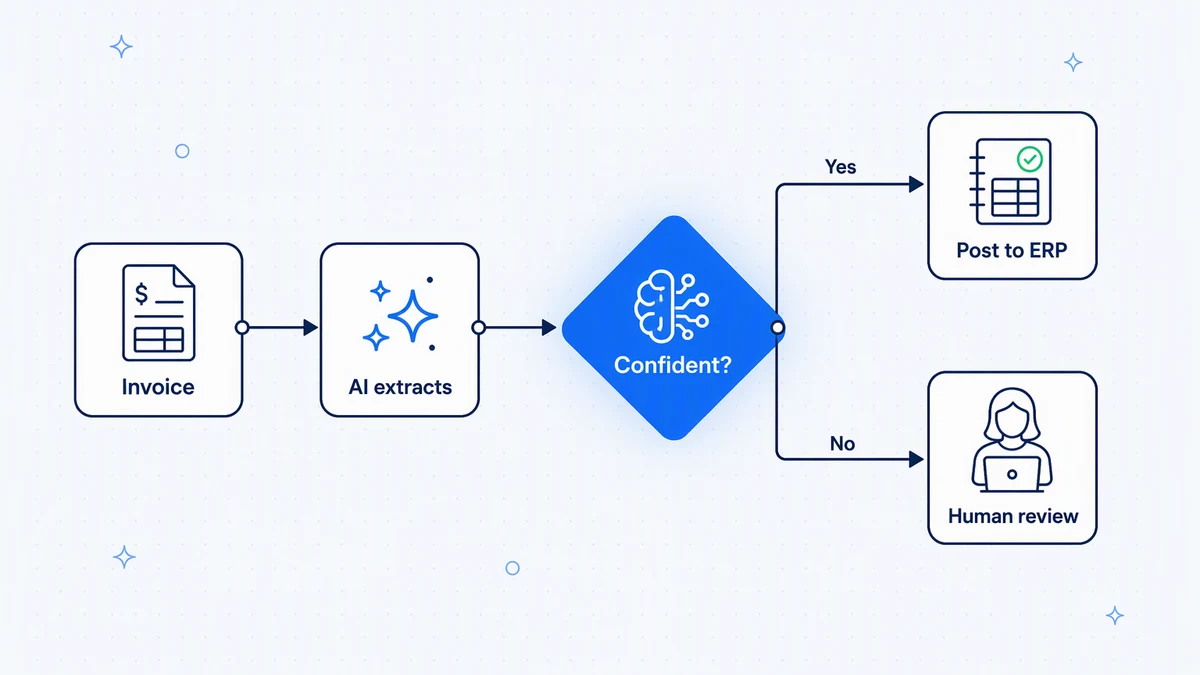
For example, in accounts payable an invoice arrives by email, AI extracts the supplier, amounts, and line items, the workflow matches them against the purchase order in the ERP, and clear matches post automatically while mismatches go to an AP specialist with the AI's suggested resolution.
⚠️ Don't let AI write directly to systems of record
Let AI produce a structured suggestion, then let the workflow validate it against business rules before anything is posted. Validation catches hallucinated values, wrong formats, and duplicate entries before they reach your ERP.
Use cases that work well
- Accounts payable: invoice extraction, PO matching, and exception handling. Our procure-to-pay guide covers the full process.
- Customer service: classifying and routing tickets, drafting replies for agents to approve, and summarising long threads.
- HR operations: answering policy questions, processing employee requests, and extracting data from onboarding documents.
- Sales operations: enriching and deduplicating leads, and updating CRM records from emails and call notes.
- IT operations: triaging incidents, linking alerts to likely causes, and suggesting runbook steps.
- Compliance: checking documents against policy and flagging what needs a reviewer.
AI agents in business processes
AI agents go a step further: instead of one AI step, an agent decides which tools to call to reach a goal, such as looking up an order, checking stock, and creating a return. That flexibility needs firmer guardrails:
- Give agents access to business systems only through governed APIs with narrow scopes.
- Label operations by risk (read, write, destructive) and require confirmation for anything that changes data.
- Log every action an agent takes, with the identity it acted as.
Our AI agent governance framework covers the organisational side.
Implementing AI process automation: a roadmap
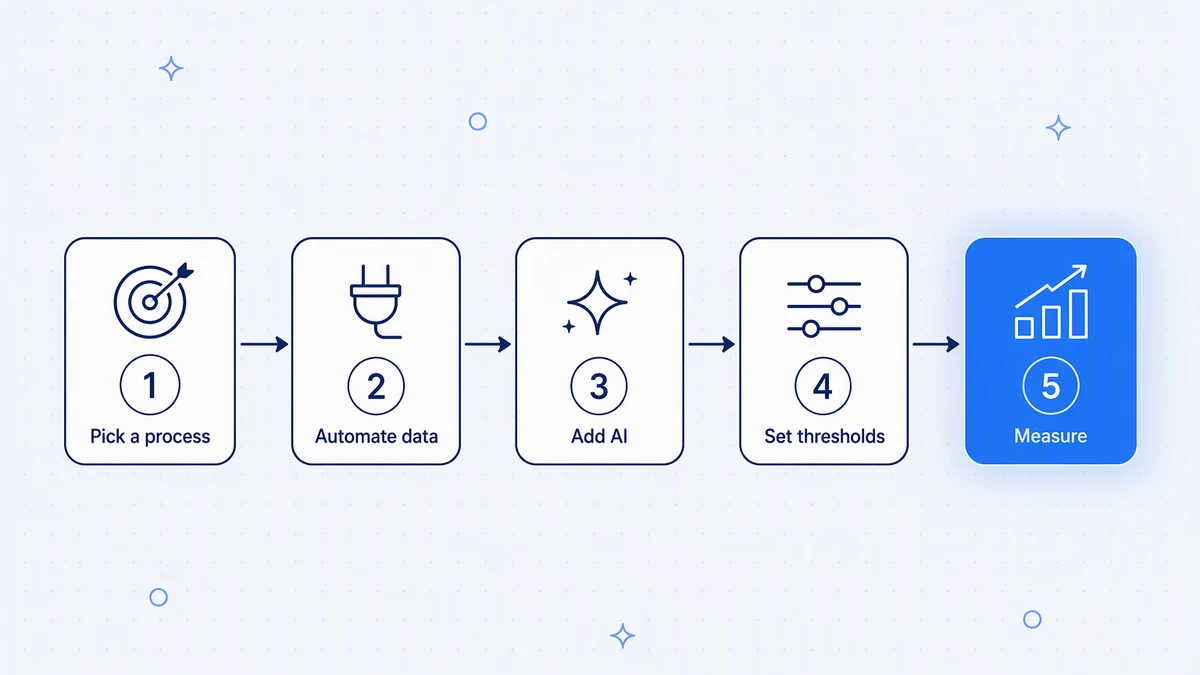
- Pick one process with high volume, clear outcomes, and measurable cost today, such as invoice processing or ticket routing.
- Map the current process and mark which steps need judgment and which are pure data movement.
- Automate the data movement first with integration and workflow tools; that's usually half the value on its own.
- Add AI to the judgment steps, with structured outputs and confidence scores.
- Set review thresholds and route low-confidence cases to people.
- Measure accuracy, straight-through processing rate, cycle time, and cost per transaction against the baseline.
- Expand to the next process once accuracy is stable.
💡 Track straight-through processing
The most useful metric is the share of cases that complete with no human touch. It shows whether AI is actually removing work, and it should rise as you tune prompts and thresholds.
Governance and risk
- Data protection: know what data is sent to AI models, where it's processed, and whether it's retained.
- Accuracy: test on real historical cases before go-live and keep sampling results afterwards.
- Explainability: store the AI's input, output, and confidence with each case, so decisions can be reviewed.
- Change control: treat prompts, models, and thresholds as versioned configuration, reviewed like code.
🧩 How Koodisi handles this
Koodisi workflows can include AI steps directly, such as extracting fields from documents or classifying requests, alongside integration steps and human approvals, so the pattern above runs in one governed workflow. Around the workflows, AI also helps build them: business analysts define systems, rules, and mappings; a design agent plans the integration; every integration is checked for governance violations and anti-patterns before rollout; and support teams see what failed and why. When AI agents need to act on your systems, Koodisi exposes your APIs as governed MCP servers with scopes, claims, and Read/Write/Destructive risk classes. See how Koodisi governs APIs and agents.
✅ Key takeaways
Use AI for interpretation and judgment; use integration for moving data and updating systems.
Validate AI output against business rules before posting, and route low-confidence cases to people.
Start with one high-volume process and measure straight-through processing and accuracy.
Govern agents through scoped APIs, risk labels, and full action logs.
Frequently asked questions
What is AI business process automation?
It's the use of AI within automated business processes to handle steps that need interpretation, such as reading documents, classifying requests, extracting data, and recommending decisions, alongside rule-based workflow and integration steps.
How is AI process automation different from RPA?
RPA automates by imitating clicks and keystrokes on screens. AI process automation interprets content and makes or suggests decisions. Both work best inside an integration-led workflow that connects systems through APIs.
Will AI replace people in business processes?
It shifts people from routine handling to reviewing exceptions and improving the process. Well-designed AI workflows keep people in charge of low-confidence and high-risk decisions.
How do I measure the ROI of AI process automation?
Compare the baseline with results for cycle time, cost per transaction, error rate, and straight-through processing rate, and include the cost of reviews and of running the AI.
Is it safe to give AI agents access to business systems?
Yes, with controls: access through governed APIs with narrow scopes, risk labels on operations, confirmation for changes, and a complete log of every agent action.
Put AI where it earns its keep
The best AI automation is a well-integrated workflow with AI in the few places that need judgment, and governance around all of it. To see Koodisi run AI steps inside governed workflows, book a demo.