

📌 TL;DR
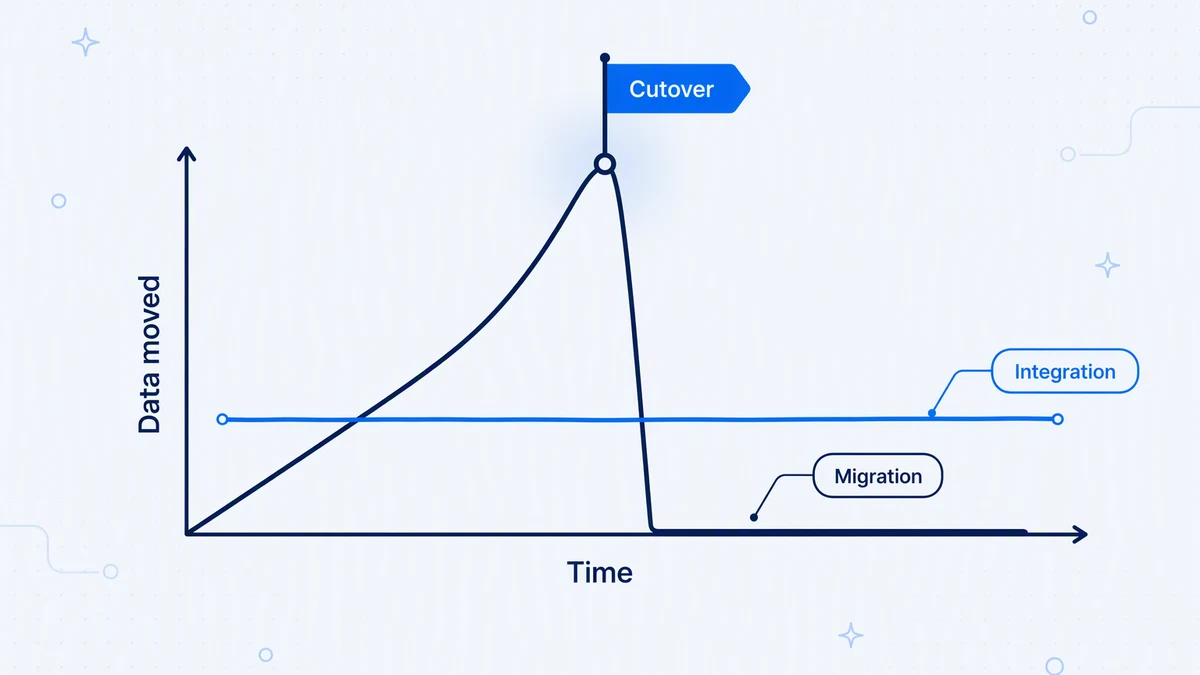
Data migration moves data from one system to another once, as a project, usually when a system is replaced; data integration keeps data flowing between systems continuously.
Migration ends with cutover and the old system switched off; integration never ends while the systems are in use.
Most system replacements need both: a migration for history, and new integrations so the new system works with everything around it.
Data migration vs data integration is the difference between a one-time move and an ongoing connection. Data migration transfers data from a source system to a target system once, typically when replacing a CRM, moving an ERP to the cloud, or consolidating systems after an acquisition. Data integration keeps data flowing between systems continuously, so they stay in sync while the business runs.
The two use similar techniques (extracting, mapping, transforming, loading) so they're often treated as the same thing. They aren't. They have different goals, risks, timelines, and success criteria, and confusing them is a common reason system replacements overrun. This guide compares them and shows how to plan both.
What data migration is
Data migration is a project with a start, a cutover, and an end:
- Assess what data exists, its quality, and what needs to move.
- Map old fields and structures to the new system.
- Cleanse duplicates, errors, and obsolete records.
- Test with trial loads and reconcile counts and values.
- Cut over: load the final data, switch users to the new system, and freeze the old one.
- Validate and decommission the old system.
Typical drivers are system replacement (Salesforce to Dynamics, SAP ECC to S/4HANA), cloud moves, mergers and acquisitions, and storage consolidation.
What data integration is
Data integration is continuous. It connects systems so that data created or changed in one appears where it's needed in others: orders from ecommerce to ERP, employees from HR to identity, customers from CRM to billing, everything into the data warehouse. It runs for as long as the systems do, and it must cope with new fields, API changes, and growing volume.
Data migration vs data integration at a glance
| Data migration | Data integration | |
|---|---|---|
| Purpose | Move data to a new system | Keep systems connected and consistent |
| Duration | One-time project, weeks to months | Ongoing, for the life of the systems |
| Direction | Old system to new system | Between many systems, sometimes both ways |
| Volume pattern | Large bulk loads, then stop | Steady flow of changes |
| Main risks | Data loss, quality problems, cutover downtime | Silent failures, drift, sync conflicts |
| Success measure | Complete, accurate data at cutover | Fresh, accurate data every day |
| Ends with | The old system switched off | Never, while systems run |
Why system replacements need both
Replacing a system is never only a migration. The old system was connected to other applications, and every one of those connections has to be rebuilt for the new system:
- Migration moves historical customers, orders, and transactions into the new system.
- Integration reconnects the new system to everything around it: CRM, billing, HR, warehouse, analytics.
- Coexistence integration often keeps old and new systems in sync during a phased rollout, when some teams or regions move before others.
⚠️ The forgotten integrations
Project plans often budget carefully for the migration and assume integrations "will be repointed". In reality every interface to the old system has to be redesigned, rebuilt, and tested, and that's frequently more work than the migration itself. Inventory every interface at the start.
Planning a migration with integration in mind
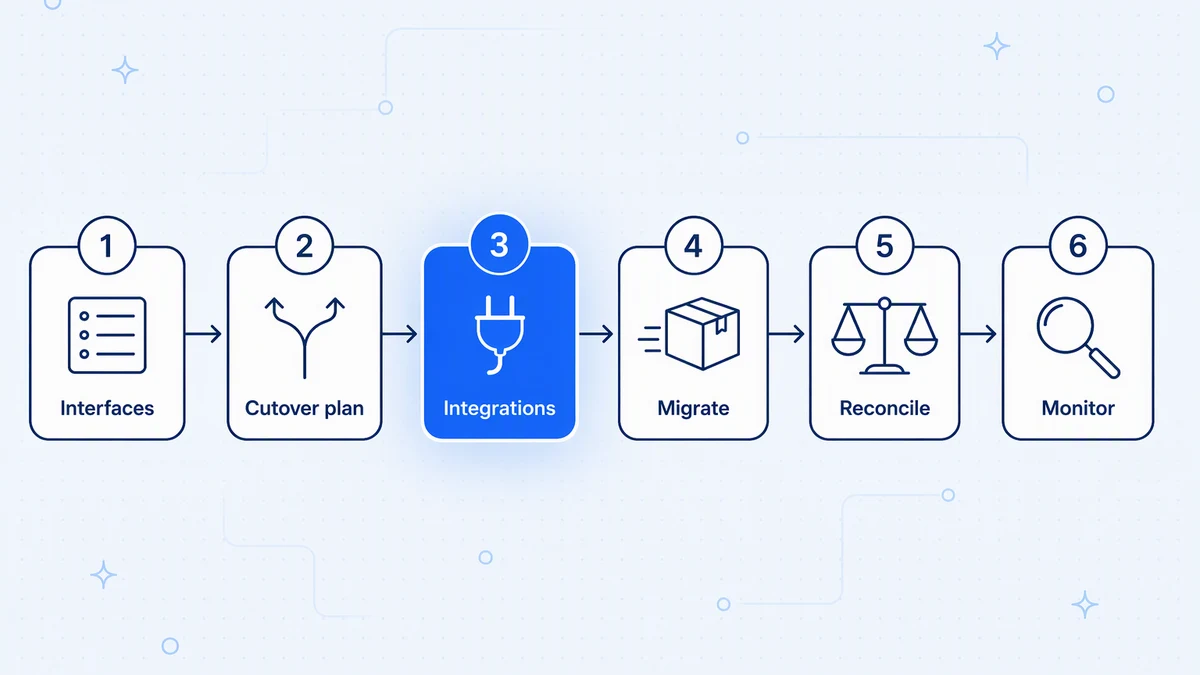
- List every interface the old system has: inbound, outbound, files, reports, and manual exports.
- Decide the cutover approach: big bang (everyone moves at once) or phased (with temporary syncs between old and new).
- Build integrations to the new system early and test them with migrated data.
- Reuse mappings: field mappings built for the migration often serve the ongoing integrations too.
- Reconcile after cutover: compare record counts and key totals between old and new.
- Monitor closely for the first weeks, when data issues surface.
💡 Migrate less history than you think
Moving every record from the last 15 years adds cost and risk. Agree with the business what history is actually needed in the new system, and archive the rest where it can still be queried.
🧩 How Koodisi handles this
Koodisi supports both sides of a system change: batch processing and visual data mapping for moving data in bulk, and workflows that connect the new system to everything around it through 97 native connectors and a REST Client, in the cloud, hybrid, or on-premise. Failed records go to Koodisi Engage for retry, and every run is traced. For legacy platform moves, see migrating TIBCO BusinessWorks to an iPaaS.
✅ Key takeaways
Migration is a one-time move; integration is a permanent connection.
System replacements need both, plus temporary syncs during a phased rollout.
Inventory every interface to the old system before the project is scoped.
Reuse migration mappings for the ongoing integrations, and reconcile after cutover.
Frequently asked questions
What is the difference between data migration and data integration?
Data migration moves data from one system to another once, usually during a system replacement. Data integration keeps data flowing between systems continuously while they're in use.
Is data migration part of data integration?
They're related but distinct. Both extract, transform, and load data, but migration is a one-time project and integration is an ongoing capability.
Can the same tools be used for migration and integration?
Often, yes. Many integration platforms and ETL tools can do bulk migration loads as well as ongoing flows, and reusing them means mappings built for the migration can be reused afterwards.
What are the biggest risks in data migration?
Data loss, poor data quality, underestimated interfaces to other systems, and extended downtime at cutover. Trial loads, reconciliation, and a full interface inventory reduce them.
How long does a data migration take?
From a few weeks for a simple system to many months for a large ERP. The number of interfaces and the state of the data usually decide the timeline more than data volume does.
Plan the move and the connections
A successful system change moves the right data once and reconnects everything for the long run. To see how Koodisi supports migration and integration together, book a demo.