

📌 TL;DR
HR workflow automation connects the HR system to the tools around it, so hires, changes, and exits trigger the right accounts, equipment, payroll updates, and approvals automatically.
The highest-value workflows are onboarding, offboarding, job and pay changes, payroll sync, and access reviews, because they cross HR, IT, finance, and security.
Start from the HR system as the source of truth, automate the cross-system steps first, and keep a full record of every change for audits.
HR workflow automation is the use of software to run HR processes, such as onboarding, offboarding, role changes, payroll updates, and approvals, automatically across the systems involved. When a new hire is entered in Workday or BambooHR, the workflow creates their accounts, orders a laptop, adds them to payroll, and notifies their manager, without anyone retyping the same details in five places.
Most HR teams already have a good HR system. What they lack is the connection between it and the identity, IT, payroll, and finance tools that also need to act. This guide covers which HR workflows to automate first, how they work end to end, and how to keep them secure and auditable.
Why HR workflows are hard to automate
HR processes cross more systems than almost any other function. A single new hire touches:
- the HR system (Workday, BambooHR, SAP SuccessFactors)
- identity and access (Okta, Microsoft Entra ID, Google Workspace)
- IT service management (ServiceNow, Jira Service Management)
- payroll (ADP, a regional payroll provider)
- finance and expenses (NetSuite, SAP Concur)
- collaboration tools (Slack, Microsoft Teams)
When those steps are manual, they happen late, inconsistently, or not at all. New starters wait days for access, and leavers keep access they shouldn't have.
HR workflows worth automating first
| Workflow | Trigger | What gets automated | Why it matters |
|---|---|---|---|
| Onboarding | New hire created in the HR system | Accounts, groups, equipment request, payroll record, welcome message, manager tasks | Day-one productivity; consistent experience |
| Offboarding | Termination or last day set | Disable access, revoke licences, recover equipment, final pay, archive data | Security and compliance; licence cost |
| Job or role change | Promotion, transfer, or new manager | Update access groups, approvals, cost centre, reporting lines | Least-privilege access stays accurate |
| Pay and benefits changes | Compensation or benefit update | Sync to payroll and finance | Fewer payroll errors |
| Payroll sync | Pay period close | Hours, deductions, and changes to payroll; journal to the ERP | Accurate pay and accounting |
| Access reviews | Schedule (e.g. quarterly) | Send managers their team's access to confirm or revoke | Audit readiness |
See how these run in practice: employee onboarding automation, offboarding automation, and payroll sync.
How an automated onboarding workflow works
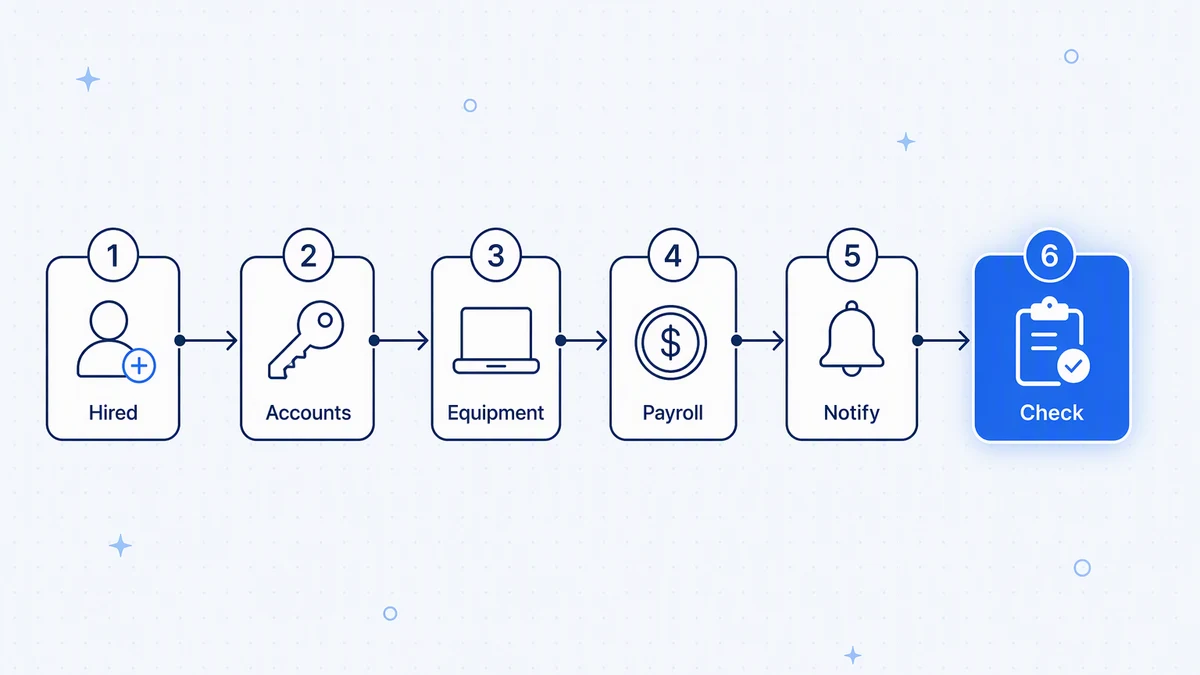
- Trigger: HR marks the candidate as hired in the HR system.
- Identity: the workflow creates the user in Okta or Entra ID and adds groups based on department and role.
- IT: it opens a laptop and equipment request in ServiceNow with the start date and location.
- Payroll: it creates or updates the employee record in payroll.
- Communication: it notifies the manager and IT in Slack or Teams, and sends the new hire a welcome email.
- Check: before day one, it confirms every step completed and flags anything that didn't.
⚠️ Offboarding is the security risk
A missed onboarding step is an inconvenience. A missed offboarding step leaves a former employee with access to email, files, and customer data. Automate offboarding early, trigger it from the HR system's termination date, and confirm every account was disabled.
Make the HR system the source of truth
- Trigger workflows from changes in the HR system, not from emails or spreadsheets.
- Derive access from role, department, and location data, so a role change updates access automatically.
- Write status back (account created, laptop shipped) so HR can see progress without chasing IT.
- Keep every change traceable: who was changed, by which workflow, and when.
💡 Map roles to access once
Create a simple table that maps job role and department to the groups and applications each person needs. Workflows use it for joiners, movers, and leavers, and it doubles as evidence for access reviews.
Measuring HR automation
- Time to productive: days from start date until the new hire has every account and device.
- Offboarding completeness: share of leavers whose access was fully removed on their last day.
- Manual touches per hire: how many steps still need a person.
- Payroll corrections: errors caused by late or missing HR data.
- Failed runs: how many workflows failed and how quickly they were fixed.
Security, privacy, and compliance
HR data includes personal and sensitive information, so the automation platform needs encryption in transit and at rest, role-based access so only authorised people see HR workflows and their data, masking for sensitive fields in logs, and a complete audit record. For payroll and access changes, auditors will ask to see exactly what changed and when.
🧩 How Koodisi handles this
Koodisi connects HR systems such as Workday and BambooHR to identity, ITSM, payroll, and collaboration tools via Koodisi's REST Client, since each of them exposes a REST API. Workflows trigger on HR events or schedules, failed records go to Koodisi Engage so a stuck onboarding is fixed by support rather than lost, and every run is traced. Field-level masking and selective logging keep sensitive HR data out of logs. See HR process automation.
✅ Key takeaways
Automate the cross-system HR workflows first: onboarding, offboarding, role changes, and payroll sync.
Trigger everything from the HR system, and derive access from role and department.
Treat offboarding as a security control and verify it completed.
Measure time to productive, offboarding completeness, and manual touches.
Frequently asked questions
What is HR workflow automation?
It's using software to run HR processes automatically across the systems involved, such as creating accounts and payroll records when someone is hired, or removing access when they leave.
Which HR processes should be automated first?
Start with onboarding, offboarding, and role changes, because they cross the most systems and carry the most risk, then automate payroll sync and access reviews.
Do I need to replace my HR system to automate workflows?
No. HR workflow automation connects your existing HR system to the other tools through their APIs. The HR system stays the source of truth.
How does HR automation improve security?
It removes access on time when people leave or change roles, keeps access aligned with job role, and produces an audit trail of every change.
Can HR workflow automation work with multiple HR or payroll systems?
Yes. Companies with several regional payroll providers or a recent acquisition can route each employee to the right system based on country or legal entity. See integrating global payroll with HR systems.
Let the HR system drive the rest
When every joiner, mover, and leaver flows automatically from the HR system, new hires are productive sooner and leavers lose access on time. To see Koodisi automate your HR workflows, book a demo.